Setting up a graph database
In my previous post I mentioned using a graph database to store data from a small cultural diplomacy database. This would be most useful considering partners and projects as a network. The example data that I am using here is rather small, but eventually I can add more data and this type of database will become more usefull. Intuitively a graph database is easier to visualise mentally than a traditional relational database. Basically it boils down to ’things’ that are related to other ’things'.
In this post I will show how to set up the nodes and relationships that model the reality of my simple cultural diplomacy dataset. I will start with the datamodel that visualises how the data elements relate to each other. Using the data in my previous post, it consist of the nodes and relationships that I will build now.
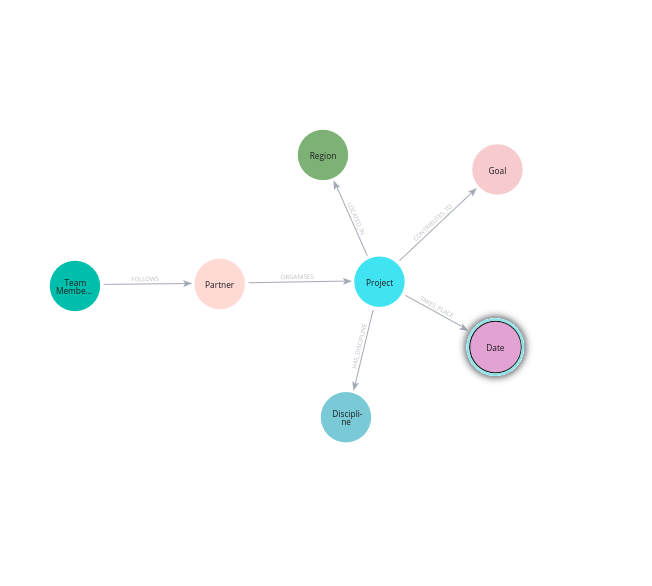
Let’s start working from left to righ. I will first create the nodes of the two team members. Cypher can read csv files. In this case fields are separated by a semi-colon, which we should indicate. Cypher reads the csv file form row to row.
LOAD CSV WITH HEADERS
FROM 'file:///randomProjectList2.csv' AS row
FIELDTERMINATOR ';'
WITH row
MERGE (p:`TeamMember` {naam: row.`TeamMember`})
When I run this code, Neo4j will return a graphical representation of the team member nodes. As some of the projects are followed by more then one team member, we get three nodes of which one with the list containing both member. We can limit the representation to the only two staff members by separating the names that are present in a list of names.
LOAD CSV WITH HEADERS
FROM 'file:///randomProjectList2.csv' AS row
FIELDTERMINATOR ';'
WITH row,
     split(row.TeamMember, ',') AS members
UNWIND members AS staff
WITH row, trim(staff) AS TeamMember

MERGE (p:`TeamMember` {naam: row.`TeamMember`})
The creation of the other nodes is pretty much following a similar pattern. Except for projects, where I have added a various properties that describe projects.
FROM 'file:///randomProjectList.csv' AS row
FIELDTERMINATOR ';'
WITH row,

MERGE (p:Project {name: row.`Project Name`})
SET p.id = row.`Project ID`
SET p.grant   = toFloat(row.Grant)
SET p.budget   = toFloat(row.`Project budget`)
SET p.disciplines = row.Discipline
SET p.regios      = row.Region
SET p.months      = row.Month
SET p.participants = toInteger(row.`Number national participants`)
The nodes are related with each other through relationships. The relationships express how and in what way the nodes are connected. Team members follow cultural partner organisations. Cultural organisations organise cultural projects. In Cypher this can be define with the following expression. In this example the two nodes TeamMember and Partner are connected with the relationship FOLLOWS. The same procedure can be followd for a Partner that ORGANISES a Project In cypher these triplets are formed as follows.
(t:TeamMember)-[f:FOLLOWS]->(p:Partner)
(p:Partner)-[o:ORGANISES]->(a:Project)
And just as an example, this is how you can create a relationship:
LOAD CSV WITH HEADERS
FROM 'file:///randomProjectList.csv' AS row
FIELDTERMINATOR ';'
WITH row,
     split(row.Discipline, ',') AS disciplines
UNWIND disciplines AS sector
WITH row, trim(sector) AS discipline

MERGE (d:Discipline {name: discipline})
MERGE (p:Project {naam: row.`Project Name`})

MERGE (p)-[:HAS_DISCIPLINE]->(d)
These were some examples and code snippets how to set up the graph database. Neo4j’s website contains some great documentation as well as online course that will teach you effectively how to create cypher queries to set up up your database and return data from it. Neo4j Docs.